01
Source Video Manager
Add folders and select one or several recordings. Saved inventories show processing status, settings, event counts and report locations. Use Scan Folder to update the saved file list.
Windows desktop application
Find motion, audio peaks and recording problems in local surveillance footage. Inspect individual recordings or a batch, then review the combined activity timeline against the original video.
Runs on your computer without uploading your footage. Start with a 14-day trial, then choose $9.99 USD/month or $99 USD/year, plus applicable tax.
Source Video Manager saves your folder list and inspection results so you can return to them later.
Add folders and select one or several recordings. Saved inventories show processing status, settings, event counts and report locations. Use Scan Folder to update the saved file list.
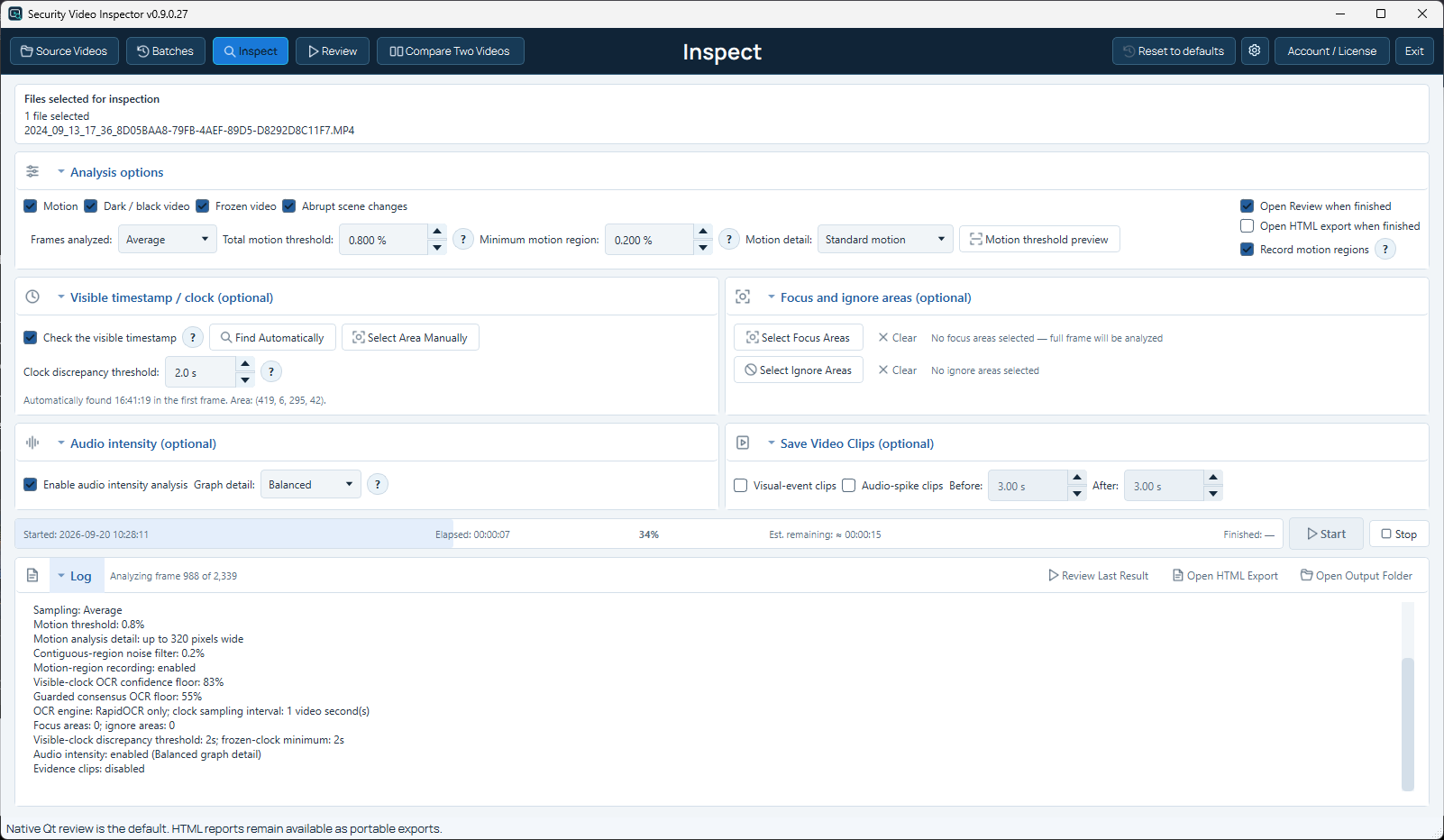
Set sampling and sensitivity. Choose focus or ignore areas, visible-clock checks, audio analysis and optional clips. Follow progress, elapsed time and the remaining-time estimate.
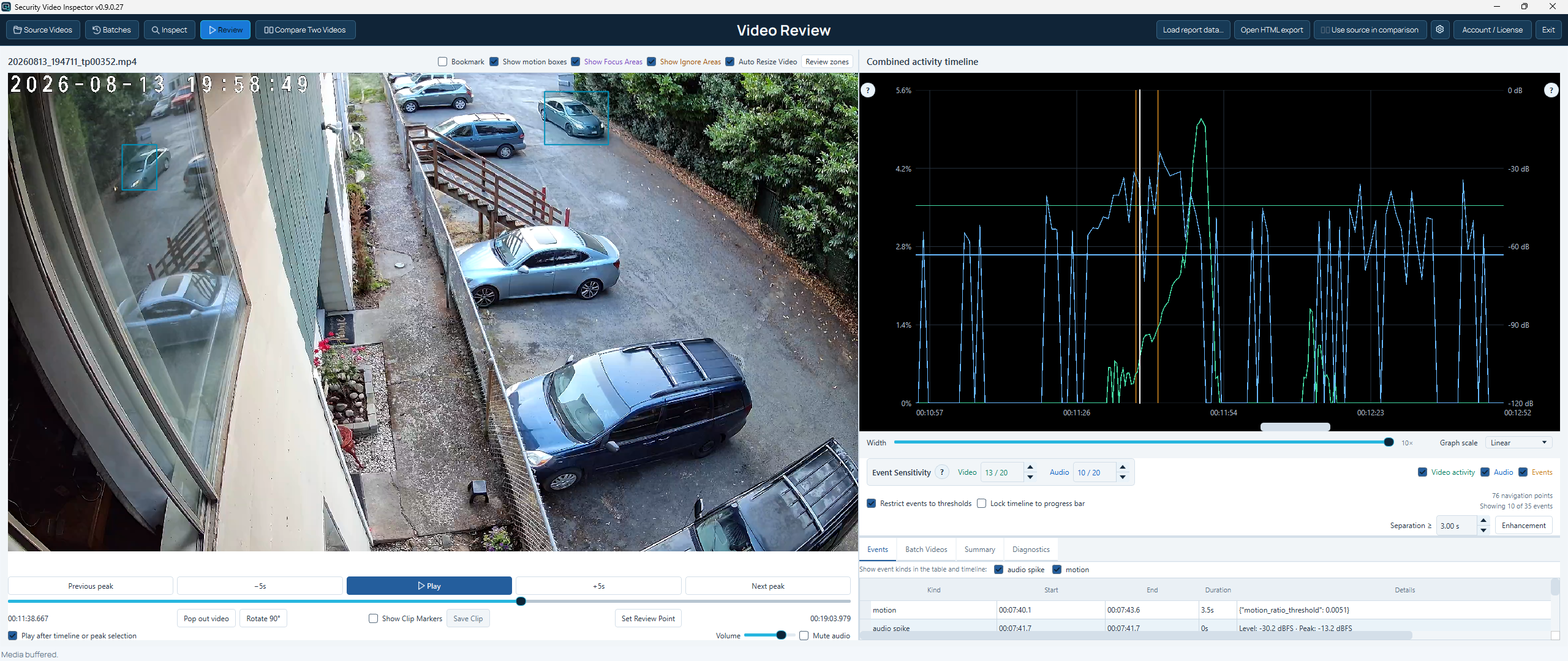
Open a result or review an entire completed batch as one continuous session. Seek to events and activity peaks while each recording remains identified on the combined timeline.
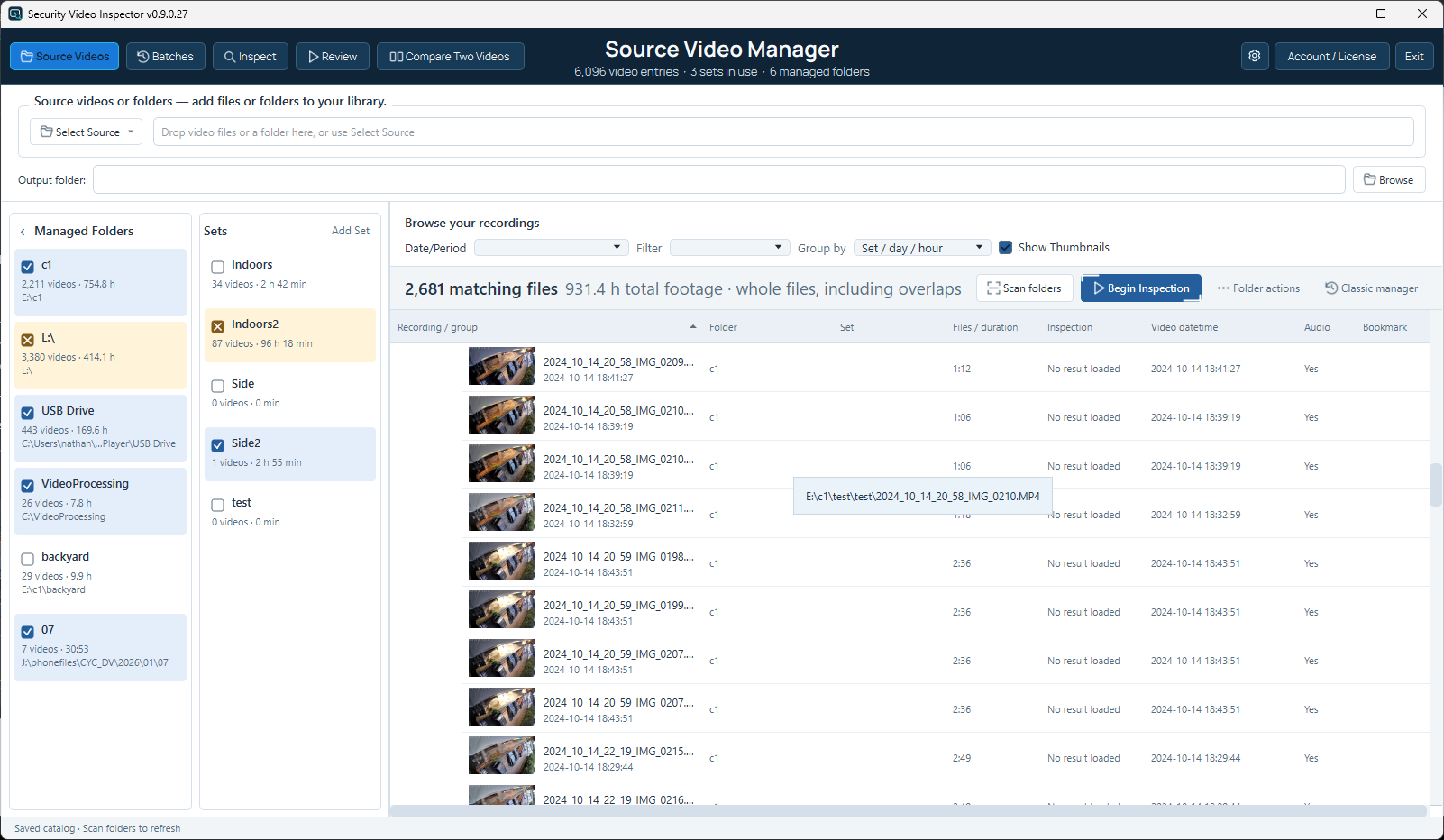
Completed inspections update the inventory automatically. Open a saved result, inspect selected files, or use a managed folder in Inspect.
Motion, dark video, frozen frames and scene changes are configurable. Clock checks, focus and ignore areas, audio and saved clips are optional.
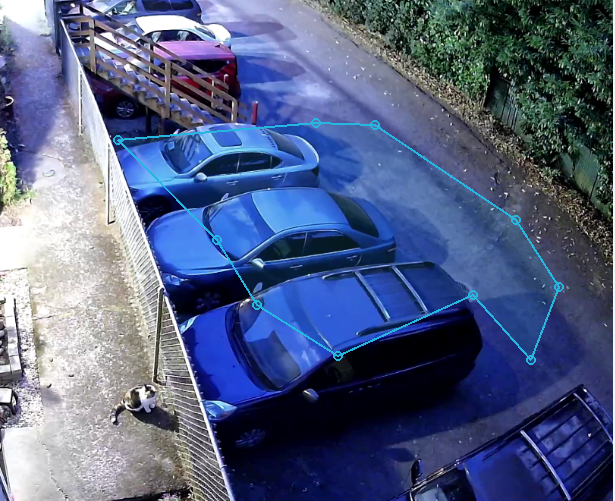
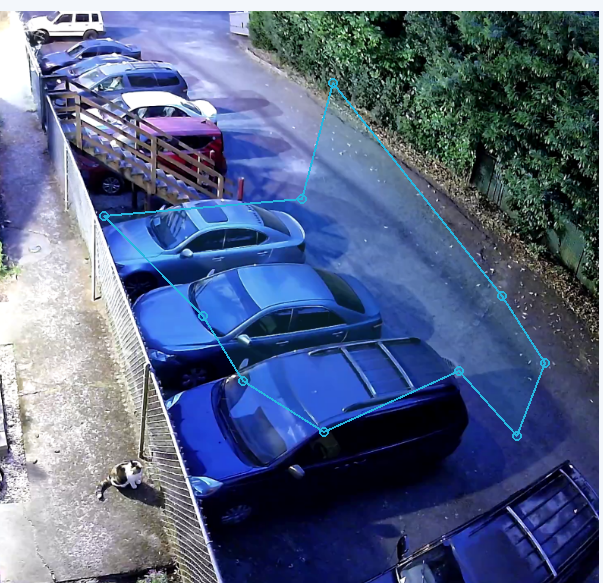
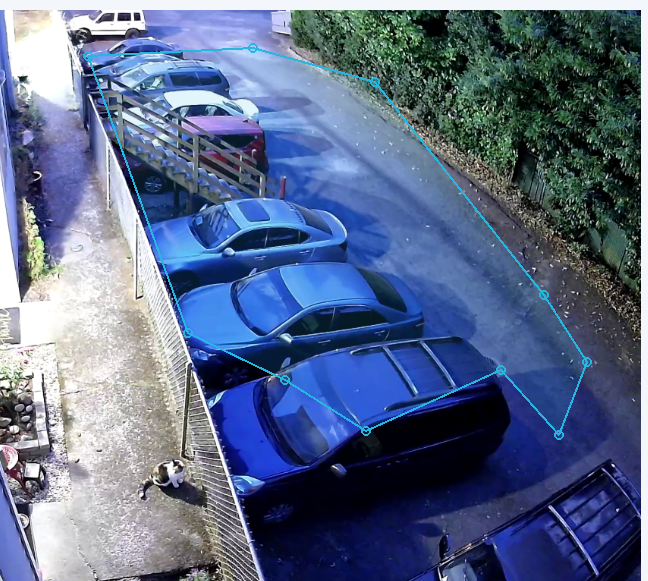
Focus areas limit analysis to selected parts of the frame. Ignore areas exclude selected parts. Both support adjustable rectangles and freeform polygons.
Choose the checks you need for each recording. Results include event times and details for review.
Measures changes between sampled frames and marks motion intervals. Recorded motion regions can be displayed as boxes during playback.
Marks unusually dark sections of a recording. These can result from poor lighting, an obstruction or recording conditions.
Repeated visual content and abrupt image changes. A still scene or a camera movement can also trigger these checks.
Reads an on-screen clock with local RapidOCR and checks for jumps or repeated times. Detect the clock area from the first frame or select it manually.
Audio levels, peaks and review points when audio analysis is enabled and FFmpeg/FFprobe are available. It does not transcribe speech.
Review source dimensions, duration, processing settings, skipped checks and verification messages in the saved HTML and JSON reports.
Click an event or activity peak to seek to that point, then play the surrounding footage.
Batch review Multiple recordings can be batched, inspected and reviewed as one continuous session. The timeline preserves recording boundaries and lets you jump directly between source videos.
Find what matters Adjust video and audio sensitivities independently during playback to include or exclude motion and audio from navigation and the event display. These display controls do not re-analyze the recording or alter saved results.
Playback and notes Zoom, pan, rotate or pop out the video. Bookmark recordings and set multiple review points so you can return to exact positions.
Clips and reports Mark a section and save it as a new MP4 file up to three minutes long. JSON and offline HTML reports retain events, warnings and inspection settings. Audio analysis and clip exports use external FFmpeg tools.
Timeline appearance Motion markers match the video graph, audio markers match the audio graph, and forward clock jumps are wider red markers. A dedicated appearance screen controls graph colors, event colors and line widths.
Compare recordings in synchronized pairs with shared playback and frame steps. Adjust Video B’s offset and save each comparison session for later.
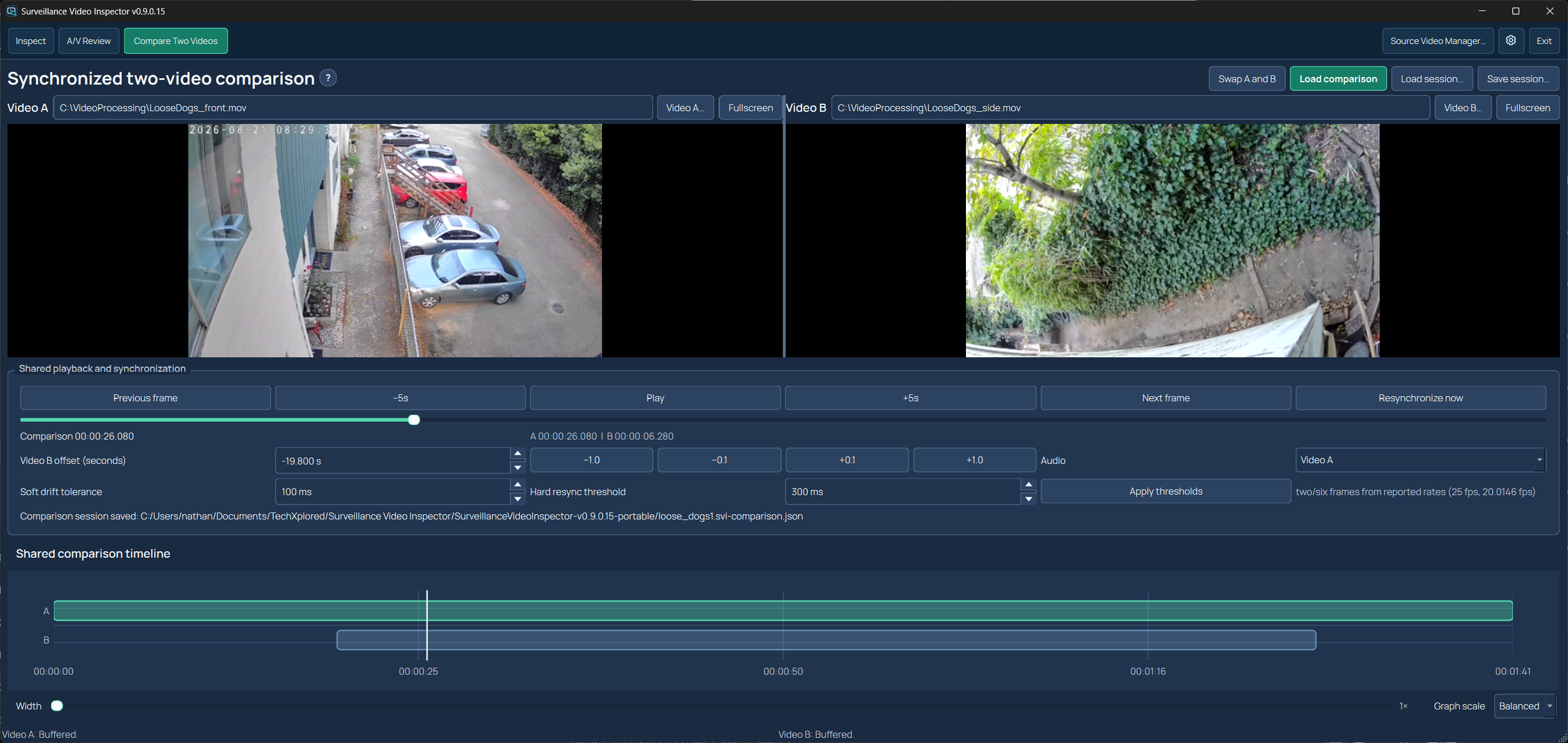
Choose any two recordings for a session, align them with the signed offset, and use drift controls or Resynchronize to maintain playback alignment. Camera clocks may still show different times.
| Capability | Security Video Inspector Desktop Windows application | Security Video Inspector Online Browser application |
|---|---|---|
| Processing location | On your computer in the desktop app | On your device in this browser; no video upload |
| Source management | Saved folder inventories and reports across sessions | Files explicitly selected for the current tab; reselect after reload |
| Batch workflow | Folder trees, sets, saved batch reports and continuous multi-recording review | Selected files inspected one at a time; results retained in the tab |
| Motion & video checks | Configurable sampling, adjustable focus and ignore areas, and saved motion overlays | OpenCV MOG2 motion with TMT/CNF filtering and recorded boxes; 320/960-pixel detail, sampled frames and browser decoding limits |
| Visible-clock OCR | Bundled local RapidOCR; automatic first-frame discovery or manual area | Optional browser Tesseract OCR; manually select each clock area; external code/model downloads |
| Audio | FFmpeg analysis, audio events and combined activity timeline | Optional Web Audio levels, audio events and a combined timeline; codec and memory limits apply |
| Review | Native A/V Review, adjustable sensitivities, bookmarks, multiple review points, clips, overlays, zoom, rotation and recording comparison | Browser player, motion boxes, peak navigation, ±5 seconds, timeline zoom, event filters and permanent review tabs |
| Warnings | Warning and verification details in saved HTML and JSON reports | A permanent Warnings tab for processing limits, skipped checks and warning events |
| Exports | JSON, offline HTML, thumbnails, evidence clips and manual MP4 clips up to three minutes | JSON and HTML reports with sampled thumbnails; no clip export |
MP4 with H.264 video and AAC audio is covered by the desktop release tests. The file picker also accepts MOV, AVI, MKV and WebM, but playback depends on the video and audio codecs. The file extension alone does not guarantee compatibility.
Use a standard export from the camera or recorder. Proprietary, encrypted or damaged recordings may need the manufacturer's export tools. Security Video Inspector Online can use only formats your browser decodes.
$9.99 USD/month or $99 USD/year, plus applicable tax. Review the monthly and yearly plans on the Security Video Inspector pricing page. Stripe calculates applicable tax and shows the total before payment.
Includes the Windows desktop application, a 14-day trial, one connected computer and up to seven days offline after a successful subscription check. Manage billing or cancel before renewal from your account.
Windows portable application
Download the Windows portable package, extract the complete folder, and run SecurityVideoInspector.exe. Keep the _internal folder beside it. Python, Qt and local OCR models are included.
Start in Source Video Manager, add a folder and select the recordings to inspect. Sign in from Account / License to connect a subscription or start an eligible trial. FFmpeg/FFprobe are separate requirements for audio analysis and clip exports. The executable is unsigned, so Windows may show an unknown-publisher warning.